AutoCAD Setting Out Checks: Automate Pile Coordinate Validation
The Pain of Manual AutoCAD Data Checks
For engineers and project managers involved in construction and infrastructure, ensuring the accuracy of setting-out data is paramount. A common, yet surprisingly tedious, task involves validating coordinate data from AutoCAD drawings. Imagine this scenario: you receive an AutoCAD drawing for a new foundation, complete with a schedule of pile coordinates neatly presented in paperspace, while the actual piles are represented as blocks in model space.
The job is clear: you need to check that the coordinates in the schedule precisely match the positions of the blocks in model space. This isn't just a formality; discrepancies can lead to costly rework, delays, and even structural integrity issues. Historically, this has been a painfully manual process, prone to human error and consuming valuable project time.
The Manual Method: A Recipe for Frustration and Errors
How do most people tackle this? Typically, it involves extracting data from both the paperspace schedule and the model space blocks, often pulling both sets of coordinates into Excel. Then begins the arduous task:
- **Lining Up Columns:** Manually arranging and aligning corresponding data points.
- **Writing Formulas:** Crafting complex Excel formulas to compare values, often wrestling with different data formats or precision levels.
- **Hunting for Differences by Eye:** After all the setup, painstakingly scanning spreadsheets, cell by cell, looking for discrepancies. This is where transcription errors, conflicting data versions, and inconsistent formats truly bite.
- **Ignoring Rounding Noise:** Deciding which minor differences are true errors and which are just artefacts of differing precision or rounding, adding another layer of mental fatigue.
This process is not only time-consuming – often taking a cumbersome hour or more for even moderately sized projects – but it's also highly unreliable. The human eye is not designed for spotting minute differences across hundreds of data points, especially when battling "last-digit rounding noise." This leads to inaccurate data, slow reporting, and ultimately, hinders timely decision-making and contributes to significant financial losses.
A Better Way: Automating Your Setting Out Checks
Frustrated by this inefficiency, I recently decided to tackle the problem head-on. Rather than enduring the typical Excel nightmare, I built a tool specifically designed to automate this kind of setting-out check. The results were immediate and transformative.
Instant, Accurate Discrepancy Identification
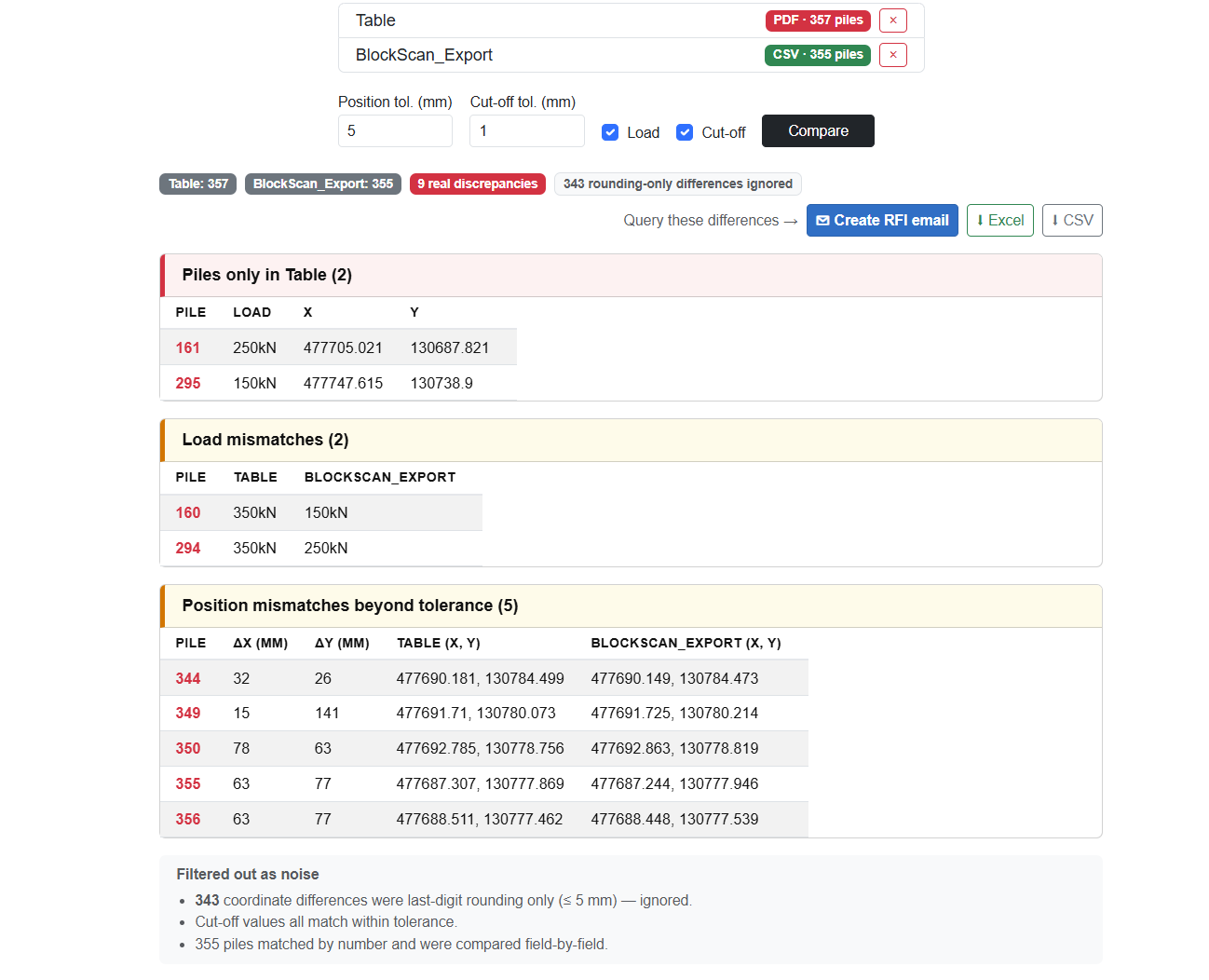
The tool's premise is simple: it extracts the relevant data from both the AutoCAD schedule and the model space blocks, then instantly compares them. What once took a painstaking hour was reduced to seconds. The discrepancies were presented in a clean, easy-to-understand table, making the problem areas immediately obvious. In my specific case, the tool highlighted:
- **Missing Elements:** A couple of piles were entirely missing from one of the data sources.
- **Incorrect Attributes:** Two piles had the wrong load specified.
- **Positional Tolerances:** Five piles were sitting outside their defined position tolerance – crucial information for any construction project.
- **Noise Filtered Out:** Critically, all that annoying last-digit rounding noise was automatically filtered, ensuring that only genuine issues were flagged.
This level of precision and speed is virtually impossible to achieve consistently with manual methods. It cuts through the complexity and presents actionable insights directly.
Beyond Identification: Automated Reporting and Communication
The utility of the tool didn't stop at just identifying discrepancies. It went further to streamline the subsequent actions:
- **Comprehensive Reports:** It automatically spat out a CSV file and a formatted Excel document containing just the discrepancies. This provides clear, undeniable evidence for further action, without requiring any manual compilation.
- **Drafted RFI Emails:** Perhaps one of the most significant time-savers was its ability to draft an RFI (Request For Information) email to the engineers, with the specific queries already written. This eliminates the need to manually compose detailed emails, ensuring clarity and consistency in communication and drastically speeding up the query resolution process.
This end-to-end automation transforms what was once a cumbersome, error-prone, and time-intensive task into a rapid, accurate, and highly efficient process. It's not just about saving time; it's about building confidence in your data and decision-making.
Who Benefits from Automated Data Validation?
While this example focuses on AutoCAD pile coordinates, the principle applies to any scenario where you need to reconcile and validate data from multiple, disparate sources. Think about:
- **Quantity Surveyors:** Checking bill of quantities against design models.
- **Infrastructure Engineers:** Verifying road or pipeline alignments against design specifications.
- **Manufacturing:** Comparing CAD designs with manufacturing data.
- **Facilities Management:** Cross-referencing asset registers with building layouts.
Any professional who regularly performs setting-out checks or similar data reconciliation tasks can gain immense value from automating these processes. The benefits extend beyond individual tasks, impacting overall project timelines, budgets, and quality control.
The Real Impact: Saving Time, Money, and Reputation
The implications of accurate and efficient data validation are profound. By reducing the reliance on manual checks, businesses can:
- **Minimise Financial Losses:** Avoid costly rework, material waste, and project delays caused by undetected errors.
- **Improve Decision-Making:** Base critical project decisions on reliable, validated data, rather than potentially flawed information.
- **Boost Productivity:** Free up skilled professionals from tedious data-entry tasks, allowing them to focus on higher-value engineering and management activities.
- **Enhance Reputation:** Deliver projects on time and to specification, building trust with clients and stakeholders.
Experience the Future of Data Validation
This kind of instant, accurate data validation isn't a pipe dream; it's a reality. If you routinely perform setting-out checks or find yourself battling similar data reconciliation challenges, you understand the value of turning a cumbersome hour into mere seconds. The tool I built for AutoCAD pile coordinate checks is free to try. I'm genuinely interested to hear how others in the industry currently handle these challenges.
You can try the app for yourself here: https://smartdatablender-cwhdd5ezb6fzf7dw.uksouth-01.azurewebsites.net/login
While this specific tool addresses a particular engineering challenge, the underlying principle of automating data combination, cleaning, and validation is at the core of what solutions like Smart Data Blender offer across various industries. By tackling the root causes of data errors and inefficiencies, businesses can unlock greater accuracy, speed, and strategic advantage.
Tired of doing this by hand?
Smart Data Blender does it automatically, in one click. Free trial, no card needed.
Try Smart Data Blender free