Why Your Project Data Doesn't Match (And How to Fix It)
The Unseen Costs of Mismatched Project Data
Imagine you’re managing a complex engineering project – say, a piling job. You’ve meticulously set out coordinates based on a schedule you received, confident everything is in order. You leave the site, only to receive an urgent call: the numbers don’t match. The ‘set out’ doesn't align with what’s expected on the ground, bringing work to a grinding halt.
This isn't a hypothetical scenario; it's a frustratingly common reality for businesses across various sectors. In this particular piling job example, the problem stemmed from a classic data coordination issue: someone had extracted point coordinates from a Civil 3D drawing, whilst someone else had numbered the piles from individual design drawings. Two separate data sources, two different interpretations, and a recipe for significant on-site disruption.
The immediate fallout was clear: confusion, wasted time, and the potential for costly reworks. But the underlying issue – uncoordinated data across disparate sources – is a pervasive challenge that can plague any project, from construction and manufacturing to finance and logistics.
Why Data Mismatches Are So Common
The scenario above perfectly illustrates the ‘why’ behind data discrepancies. Here are the common culprits:
- Data Silos: Information exists in separate systems, departments, or even individual computers, preventing a unified view. In our piling example, Civil 3D drawings and individual design drawings were effectively silos.
- Manual Data Entry and Transcription Errors: Human input is prone to mistakes. Typing errors, misinterpretations, or simply oversight can introduce inaccuracies when data is moved from one source to another.
- Inconsistent Formats and Naming Conventions: One system might use “P-001” whilst another uses “Pile_1.” Dates might be “DD/MM/YYYY” in one place and “MM-DD-YY” in another. Without standardisation, matching becomes a nightmare.
- Conflicting Data Versions: When multiple people work on data, versions can diverge. Which is the “master” or most up-to-date source? Without clear version control, conflicts are inevitable.
- Lack of Unique Identifiers: If there isn't a single, unique field (like a project ID or a specific pile number) that consistently links related pieces of information across all sources, matching becomes an educated guess.
The Tangible Impact of Uncoordinated Data
Beyond the immediate frustration, the consequences of mismatched data are substantial:
- Project Delays: Halting work on a piling job due to unmatching coordinates directly translates to lost time and extended project timelines.
- Financial Losses: Reworking designs, re-mobilising teams, ordering incorrect materials – all incur significant, avoidable costs. Gartner reports that poor data quality costs businesses an average of $15 million per year.
- Compromised Decision-Making: If the data used for planning or reporting is inaccurate, the decisions based on it will also be flawed, leading to suboptimal outcomes.
- Reduced Efficiency: Hours are wasted manually cross-referencing, correcting errors, and trying to reconcile conflicting information instead of focusing on productive tasks.
- Reputational Damage: Consistently delivering projects with errors or delays can erode client trust and damage a company’s standing in the market.
Beyond Manual Checks: A Smarter Approach to Data Matching
In the piling job example, the immediate need was to reconcile the differing pile numbers and coordinates quickly and accurately. The available data included various PDFs of the plots and an AutoCAD drawing of the original coordinates. Manually sifting through these disparate documents to cross-reference each pile would have been incredibly time-consuming and still prone to human error.
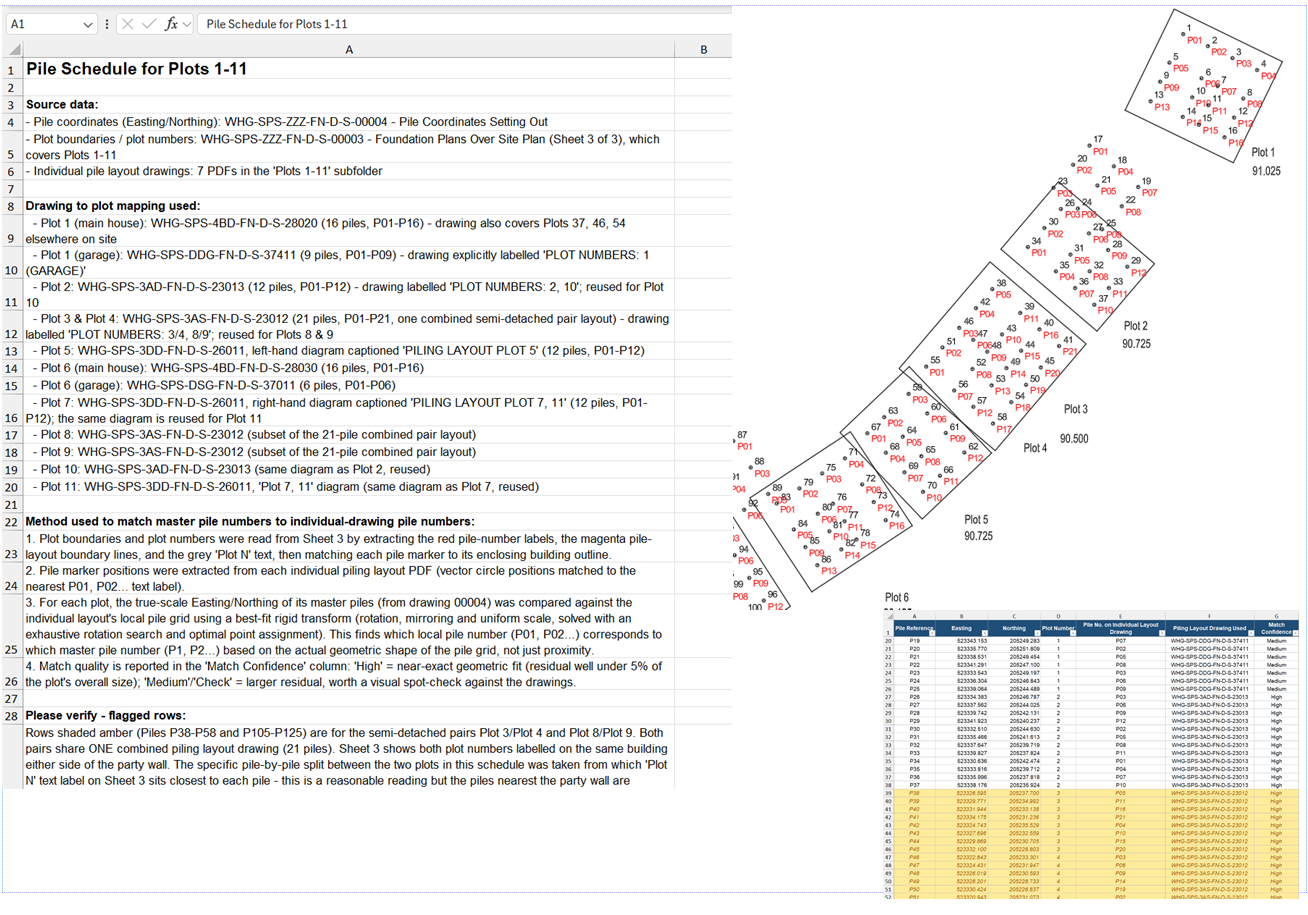
Instead, a more intelligent approach was adopted. The AutoCAD drawing was plotted to PDF, and then an AI assistant (Claude) was set to work. The task was to match the pile numbers across the entire job by processing the visual and textual data within the PDFs.
The result? The AI “did a very good job of it” – extracting the necessary information, understanding the relationships, and producing a coherent schedule and an updated drawing of all the collated data. This demonstrates the power of leveraging advanced tools to tackle complex data matching challenges that would overwhelm traditional manual methods.
Practical Strategies for Proactive Data Coordination
Whilst reactive problem-solving is sometimes necessary, the goal should always be proactive data coordination. Here are key strategies:
Standardise Your Data Inputs
Wherever possible, establish clear protocols for data entry, formatting, and naming conventions across all departments and systems. This includes consistent use of units, date formats, and terminology. The more uniform your raw data, the easier it is to combine and compare.
Implement Unique Identifiers
Ensure every critical entity – be it a pile, a component, a customer, or a transaction – has a unique identifier that remains consistent across all systems. This “key” is essential for accurately linking related records when performing data matching.
Break Down Data Silos
Invest in solutions that enable different systems to communicate and share data seamlessly. This could involve API integrations, data warehousing, or enterprise resource planning (ERP) systems that unify information flow. The goal is to move away from isolated islands of data.
Leverage Intelligent Data Matching Tools
As demonstrated by the piling job, intelligent tools can automate the process of identifying and reconciling mismatched or duplicate records. These tools go beyond simple exact matches, often using fuzzy logic, machine learning, and contextual analysis to find connections even when data isn’t perfectly identical. They can process various data types – from structured spreadsheets to unstructured text in PDFs – to create a consolidated view.
Smart Data Blender: Your Solution for Coherent Project Data
The challenges exemplified by the piling job – significant time waste and costly errors due to manual data entry and spreadsheet manipulation – are precisely what Smart Data Blender is designed to solve.
It acts as a powerful solution for businesses struggling to combine, clean, and validate data from multiple sources. With Smart Data Blender, you can overcome transcription errors, resolve conflicting data versions, normalise inconsistent formats, and effortlessly merge data from different systems (breaking down those notorious data silos). This eliminates the need for labour-intensive manual reconciliation, leading to robust, reliable reporting and, crucially, timely and accurate decision-making. Learn more about how to harmonise your data at Smart Data Blender.
Conclusion: Investing in Data Accuracy Pays Dividends
The story of the mismatched piling coordinates is a potent reminder that uncoordinated data isn’t just an IT headache – it’s a direct threat to project success and profitability. By understanding the root causes of data mismatches and implementing proactive strategies, particularly by leveraging intelligent data matching tools, businesses can transform their approach to data. This shift from reactive problem-solving to proactive data harmonisation isn't just about avoiding costly errors; it's about building a foundation of data integrity that drives efficiency, fosters better decision-making, and ultimately ensures the seamless execution of every project.
Tired of doing this by hand?
Smart Data Blender does it automatically, in one click. Free trial, no card needed.
Try Smart Data Blender free